一次与多个客户一起工作时,有必要快速分析不同帐户和报告中的许多信息。 当客户超过10个时,营销商将不再有时间不断监视统计信息。 但是有办法。
在本文中,我将讨论如何使用API和Python监视广告帐户。
在出口处,我们将收到对Yandex.Direct API的请求,通过该请求,我们将收到有关广告活动的统计信息,并将能够处理这些数据。
为此,我们需要:
- 获取Yandex Direct API令牌
- 编写服务器请求
- 将数据导入DataFrame
导入库
您需要导入查询中使用的库以及pandas和DataFrame。
所有导入将如下所示:
import requests from requests.exceptions import ConnectionError from time import sleep import json import pandas as pd import numpy as np from pandas import Series,DataFrame
接收令牌
目前,我不能说比Yandex.Direct API的文档更好的内容,所以我将留下一个链接。
(
获取令牌的说明 )
我们正在向Yandex.Direct API服务器发送请求
复制API文档中的请求更改请求。令牌。
令牌='blaBlaBLAblaBLABLABLAblabla'
登入
clientLogin ='e-66666666'
从这个
body = { "params": { "SelectionCriteria": { "DateFrom": "_", "DateTo": "_" }, "FieldNames": [ "Date", "CampaignName", "LocationOfPresenceName", "Impressions", "Clicks", "Cost" ], "ReportName": u("_"), "ReportType": "CAMPAIGN_PERFORMANCE_REPORT", "DateRangeType": "CUSTOM_DATE", "Format": "TSV", "IncludeVAT": "NO", "IncludeDiscount": "NO"
做吧
body = { "params": { "SelectionCriteria": { "Filter": [ { "Field": "Clicks", "Operator": "GREATER_THAN", "Values": [ "0" ] }, ] }, "FieldNames": [ "CampaignName", "Impressions", "Clicks", "Ctr", "Cost", "AvgCpc", "BounceRate", "AvgPageviews", "ConversionRate", "CostPerConversion", "Conversions" ], "ReportName": u("Report4"), "ReportType": « ", "DateRangeType": "LAST_5_DAYS", "Format": "TSV", "IncludeVAT": "NO", "IncludeDiscount": "NO" } }
在
SelectionCriteria中,我们编写了如何选择数据。 默认情况下,此处写有2个日期,但是为了不必经常更改它们,我们将时间段替换为“过去5天”。
我们为数据设置过滤器 。 这主要是为了不获取空值。 问题是Direct会将丢失的数据显示为两个负号,这导致整个列的数据类型发生更改,在此之后,如果没有不必要的手势,您将无法执行数学运算。
栏位名称 我们在这里写入您需要的数据。 我注册了用于分析的字段,您的列表可能会有所不同。
报告类型 报告类型写在此字段中,对于广告系列,需要此报告。
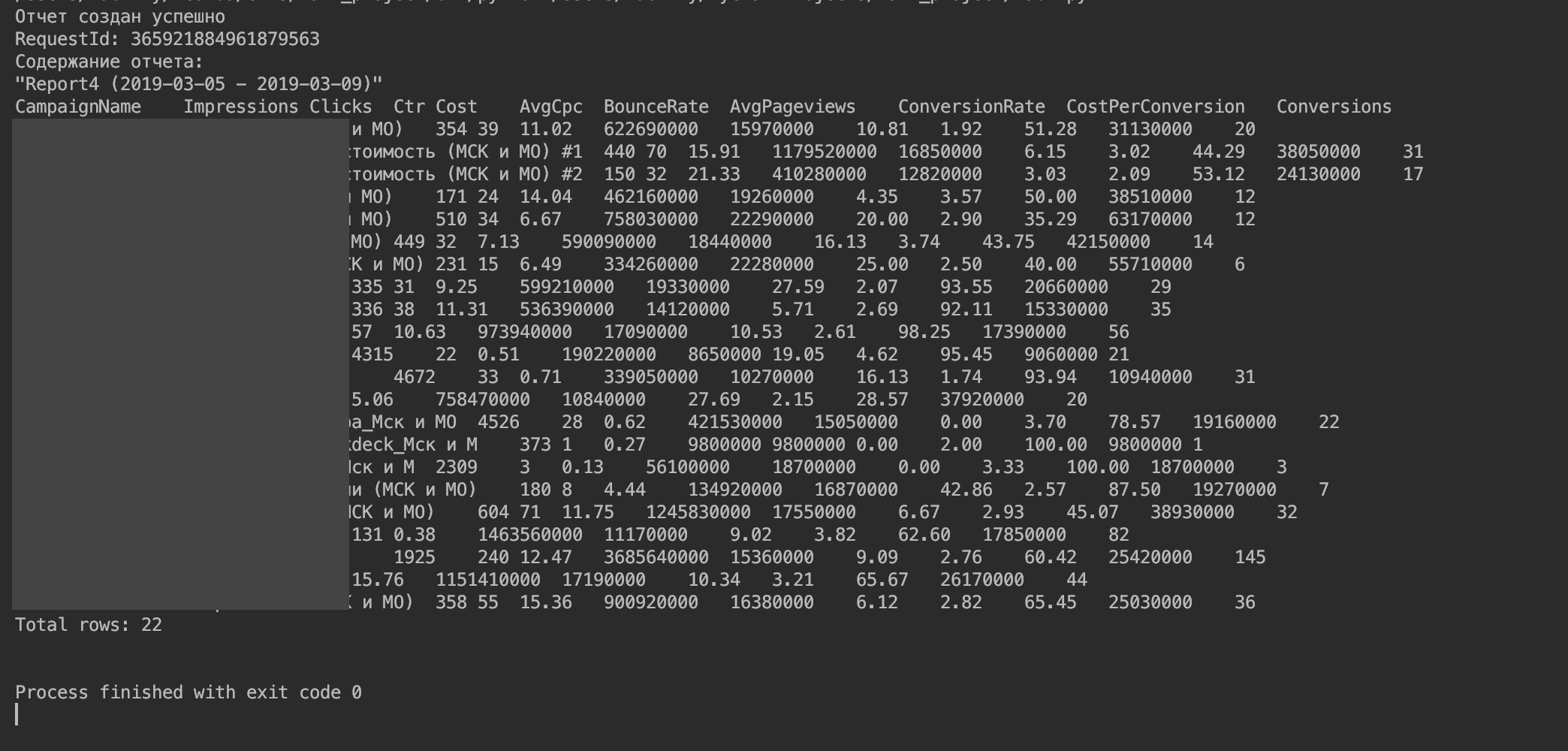
你应该得到这样的东西。
5.将数据导入到DataFrame中。
(DataFrame可能是处理此数据的最合适方法。)
我能够通过编写和读取一个csv文件来实现此功能。
我们在查询中找到负责统计输出的部分-这是“ req.text”。
我们删除程序的标准输出以写入文件。 为此,请更改代码200中的所有结论。
print(" ") print("RequestId: {}".format(req.headers.get("RequestId", False))) print(" : \n{}».format(u(req.text)))
开启:
format(u(req.text))
现在将服务器响应导入到DataFrame中。
file = open("cashe.csv", "w") file.write(req.text) file.close() f = DataFrame.from_csv("cashe.csv",header=1, sep=' ', index_col=0,)
逐步:
- 打开(并自动创建)Cashe.csv文件进行写入
- 我们将服务器响应写入其中
- 关闭档案
- 以DataFrame的形式打开文件(指定文件名,表头在哪行,数据之间的除数是什么,列在索引中)
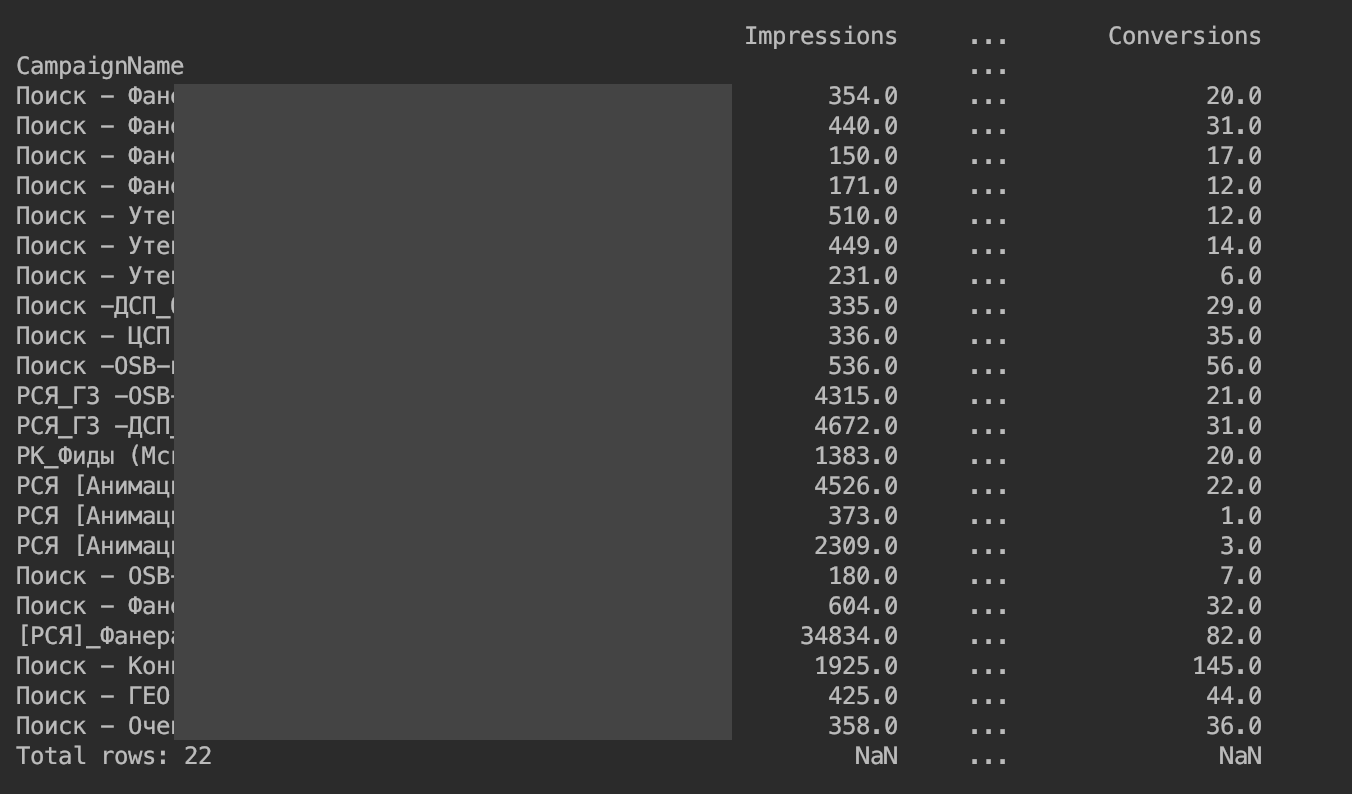
结果是:
我们删除了对列输出的限制:
pd.set_option('display.max_columns', None) pd.set_option('display.expand_frame_repr', False) pd.set_option('max_colwidth', -1)
现在一切都显示了:
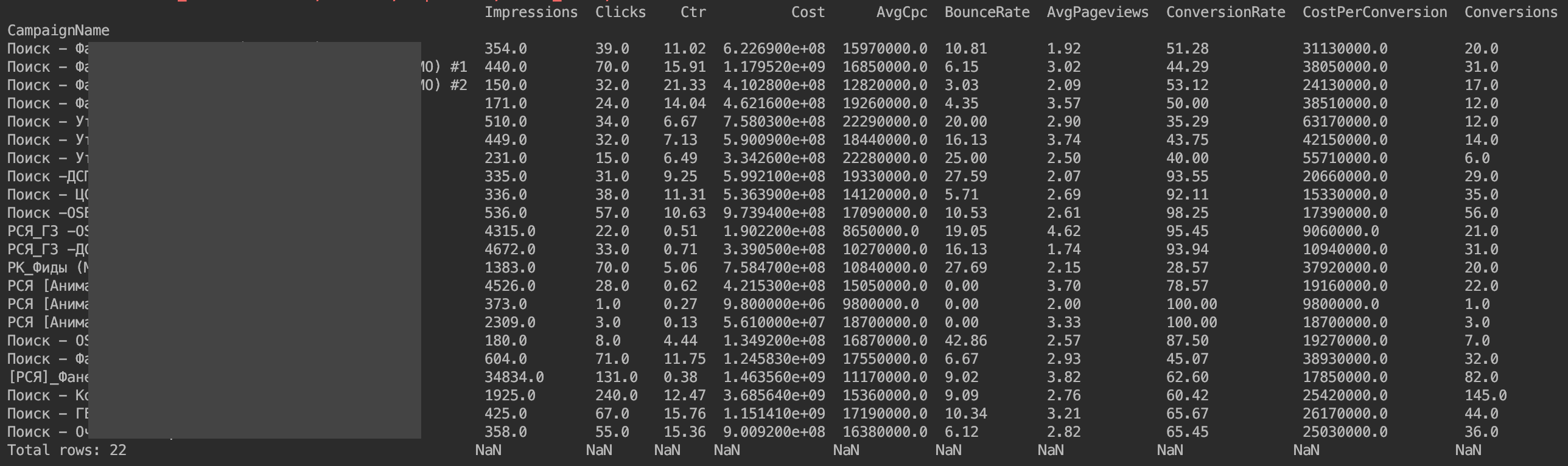
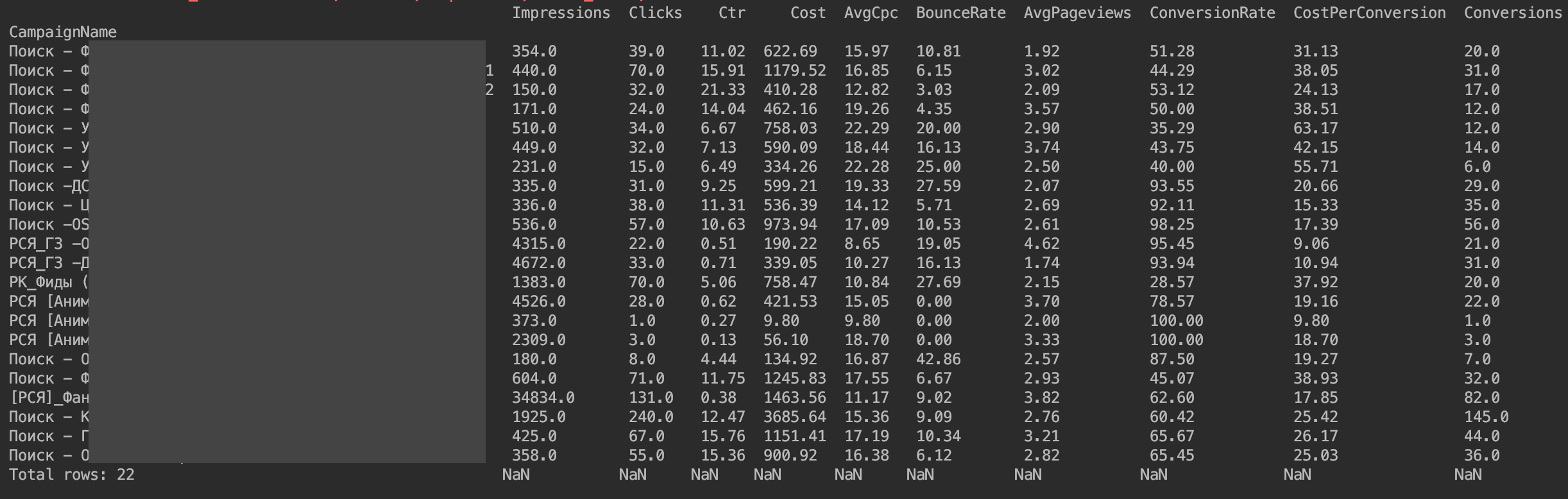
唯一的问题是,货币价值没有按其期望显示。 这些是Yandex.Direct API实现的功能。 我们只需要将货币值除以1,000,000。
f['Cost'] = f['Cost']/1000000 f['AvgCpc'] = f['AvgCpc']/1000000 f['CostPerConversion'] = f['CostPerConversion']/1000000
我还建议立即按点击次数排序
f=f.sort_values(by=['Clicks'], ascending=False)
所以我们准备好DataFrame进行分析
就我自己而言,我按日期和按活动编写了类似的统计请求,以便始终了解流量偏差并了解偏差大致在何处发生。
谢谢您的关注。
结束码: import requests from requests.exceptions import ConnectionError from time import sleep import json import pandas as pd import numpy as np from pandas import Series,DataFrame pd.set_option('display.max_columns', None) pd.set_option('display.expand_frame_repr', False) pd.set_option('max_colwidth', -1) # UTF-8 Python 3, Python 2 import sys if sys.version_info < (3,): def u(x): try: return x.encode("utf8") except UnicodeDecodeError: return x else: def u(x): if type(x) == type(b''): return x.decode('utf8') else: return x # --- --- # Reports JSON- () ReportsURL = 'https://api.direct.yandex.com/json/v5/reports' # OAuth- , token = ' ' # # , clientLogin = ' ' # --- --- # HTTP- headers = { # OAuth-. Bearer "Authorization": "Bearer " + token, # "Client-Login": clientLogin, # "Accept-Language": "ru", # "processingMode": "auto" # # "returnMoneyInMicros": "false", # # "skipReportHeader": "true", # # "skipColumnHeader": "true", # # "skipReportSummary": "true" } # body = { "params": { "SelectionCriteria": { "Filter": [ { "Field": "Clicks", "Operator": "GREATER_THAN", "Values": [ "0" ] }, ] }, "FieldNames": [ "CampaignName", "Impressions", "Clicks", "Ctr", "Cost", "AvgCpc", "BounceRate", "AvgPageviews", "ConversionRate", "CostPerConversion", "Conversions" ], "ReportName": u("Report4"), "ReportType": "CAMPAIGN_PERFORMANCE_REPORT", "DateRangeType": "LAST_5_DAYS", "Format": "TSV", "IncludeVAT": "NO", "IncludeDiscount": "NO" } } # JSON body = json.dumps(body, indent=4) # --- --- # HTTP- 200, # HTTP- 201 202, while True: try: req = requests.post(ReportsURL, body, headers=headers) req.encoding = 'utf-8' # UTF-8 if req.status_code == 400: print(" ") print("RequestId: {}".format(req.headers.get("RequestId", False))) print("JSON- : {}".format(u(body))) print("JSON- : \n{}".format(u(req.json()))) break elif req.status_code == 200: format(u(req.text)) break elif req.status_code == 201: print(" ") retryIn = int(req.headers.get("retryIn", 60)) print(" {} ".format(retryIn)) print("RequestId: {}".format(req.headers.get("RequestId", False))) sleep(retryIn) elif req.status_code == 202: print(" ") retryIn = int(req.headers.get("retryIn", 60)) print(" {} ".format(retryIn)) print("RequestId: {}".format(req.headers.get("RequestId", False))) sleep(retryIn) elif req.status_code == 500: print(" . , ") print("RequestId: {}".format(req.headers.get("RequestId", False))) print("JSON- : \n{}".format(u(req.json()))) break elif req.status_code == 502: print(" .") print(", - .") print("JSON- : {}".format(body)) print("RequestId: {}".format(req.headers.get("RequestId", False))) print("JSON- : \n{}".format(u(req.json()))) break else: print(" ") print("RequestId: {}".format(req.headers.get("RequestId", False))) print("JSON- : {}".format(body)) print("JSON- : \n{}".format(u(req.json()))) break # , API except ConnectionError: # print(" API") # break # - except: # print(" ") # break file = open("cashe.csv", "w") file.write(req.text) file.close() f = DataFrame.from_csv("cashe.csv",header=1, sep=' ', index_col=0,) f['Cost'] = f['Cost']/1000000 f['AvgCpc'] = f['AvgCpc']/1000000 f['CostPerConversion'] = f['CostPerConversion']/1000000 f=f.sort_values(by=['Clicks'], ascending=False) print(f)